Make a gift
Your gift
changes a life
100% of your donation reaches the field. No overseas salaries, no glossy offices — just food, care, and opportunity.
Local payment · Tanzania
Donate via M-Pesa Lipa Namba
Pay instantly from Vodacom, Airtel, Mixx by Yas, Halotel, or any bank — all networks accepted via TIPS.
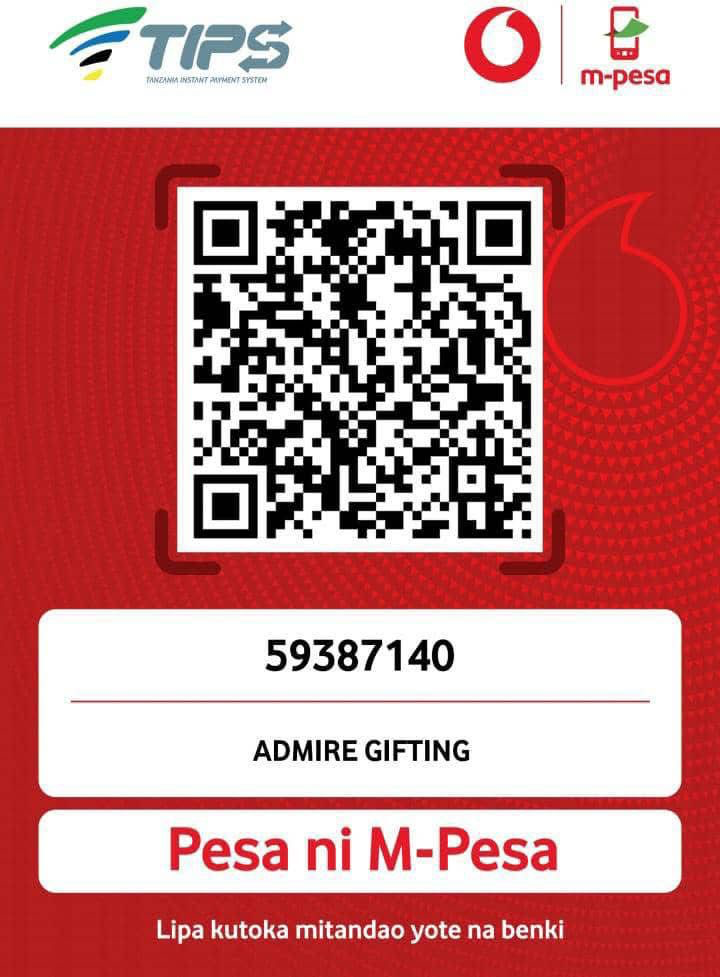
Lipa Namba
59387140
ADMIRE GIFTING
M-Pesa Lipa Namba
Powered by TIPS — Tanzania Instant Payment System.
Pay from any mobile network or bank in Tanzania.
- 1 Dial *150*00# on your Vodacom line, or open the M-Pesa app.
- 2 Select "Lipa" (Pay), then choose "Lipa Namba" (Pay to Business).
- 3 Enter the Lipa Namba: 59387140 — the business name ADMIRE GIFTING will appear to confirm.
- 4 Enter the amount you wish to donate (in Tanzanian Shillings).
- 5 Enter your M-Pesa PIN and confirm. You will receive an SMS confirmation shortly.
After payment, share your M-Pesa confirmation number so we can acknowledge your gift:
WhatsApp +255 769 115 280
admiregift@yahoo.com
Tanzania's TIPS interoperability lets Airtel, Mixx by Yas, Halopesa and T-Pesa users pay directly to an M-Pesa Lipa Namba — no Vodacom SIM needed.
- Dial *150*60# or open the Airtel Money app
- Select "Lipa", then choose "Lipa Namba"
- Enter Lipa Namba 59387140
- Verify the name ADMIRE GIFTING appears on screen
- Enter the donation amount
- Enter your PIN to confirm — you'll receive an SMS receipt
- Dial *150*01# or open the Mixx by Yas app
- Select "Lipa", then choose "Lipa Namba"
- Enter Lipa Namba 59387140
- Verify the name ADMIRE GIFTING appears on screen
- Enter the donation amount
- Enter your PIN to confirm — you'll receive an SMS receipt
- Dial *150*88# or open the Halopesa app
- Select "Lipa", then choose "Lipa Namba"
- Enter Lipa Namba 59387140
- Verify the name ADMIRE GIFTING appears on screen
- Enter the donation amount
- Enter your PIN to confirm — you'll receive an SMS receipt
- Dial *150*71# or open the T-Pesa app
- Select "Lipa", then choose "Lipa Namba"
- Enter Lipa Namba 59387140
- Verify the name ADMIRE GIFTING appears on screen
- Enter the donation amount
- Enter your PIN to confirm — you'll receive an SMS receipt
Menu labels vary slightly by app version. If you don't see "Lipa Namba," try "Pay to Business," "Lipa kwa Namba," or "TIPS Payment." Always confirm ADMIRE GIFTING before entering your PIN. Then share your confirmation number so we can acknowledge your gift:
WhatsApp +255 769 115 280
admiregift@yahoo.com
All banks connected to TIPS/PESALINK can send directly to an M-Pesa Lipa Namba. Use your bank's mobile or internet banking app.
- 1 Open your bank's mobile banking app or log in to internet banking.
- 2 Go to "Transfer", "Pay Bills", or "Mobile Money Transfer".
- 3 Select "M-Pesa" or "Vodacom M-Pesa" as the destination network, and choose "Lipa Namba / Business Pay".
- 4 Enter the Lipa Namba: 59387140 — verify the name ADMIRE GIFTING appears before proceeding.
- 5 Enter the amount, add a reference (e.g., "Donation"), and confirm the transaction with your PIN or OTP.
Works with CRDB, NMB, NBC, Stanbic, Equity, KCB, DTB, Absa, and all other TIPS-connected banks in Tanzania. If your bank app doesn't show this option, contact your branch for TIPS transfer instructions. Then share your confirmation number so we can acknowledge your gift:
WhatsApp +255 769 115 280
admiregift@yahoo.com
What your gift does
Impact calculator
Your donation in action
$10
40 meals for children · doubled to 80 this month
$25
100 meals · doubled to 200
$50
200 meals · one elder's full month of visits and medicine
$100
400 meals · stocks one village food store for two weeks
$250
1,000 meals · a full month of elder care in one community
$500+
Named sponsor for one community for one month — we'll write to you
Why trust AGS?
0% overseas overhead
Every dollar reaches the field — none is spent internationally
Full transparency
Annual reports published publicly with full financial statements
Community endorsed
Formally recognised by local councils and village leaders across Tanzania
Giving FAQs
AGS is a registered NGO in Tanzania. Tax deductibility depends on your country of residence — please check with your local tax authority or ask us for our official registration documentation.
Yes — you can cancel, pause, or change your monthly gift at any time by contacting us at admiregift@yahoo.com. We will process your request within 5 working days and confirm by email.
Monthly donors receive a field update within 30 days showing exactly how their contribution was deployed — including the number of meals served, elders visited, or school supplies purchased, with photos from the field.
Yes! Use the cause selector in the donation widget to direct your gift to School & Nutrition, Home Care & Company, or the Harvest Fund. If you select "Where needed most," AGS will allocate your gift to the most urgent need that week.
Every gift reaches the field
100% of donations go directly to field operations in Tanzania — no overseas overhead, no exceptions.